AI Agent: Procurement Policy Advisor
AI Agent: Procurement Policy Advisor
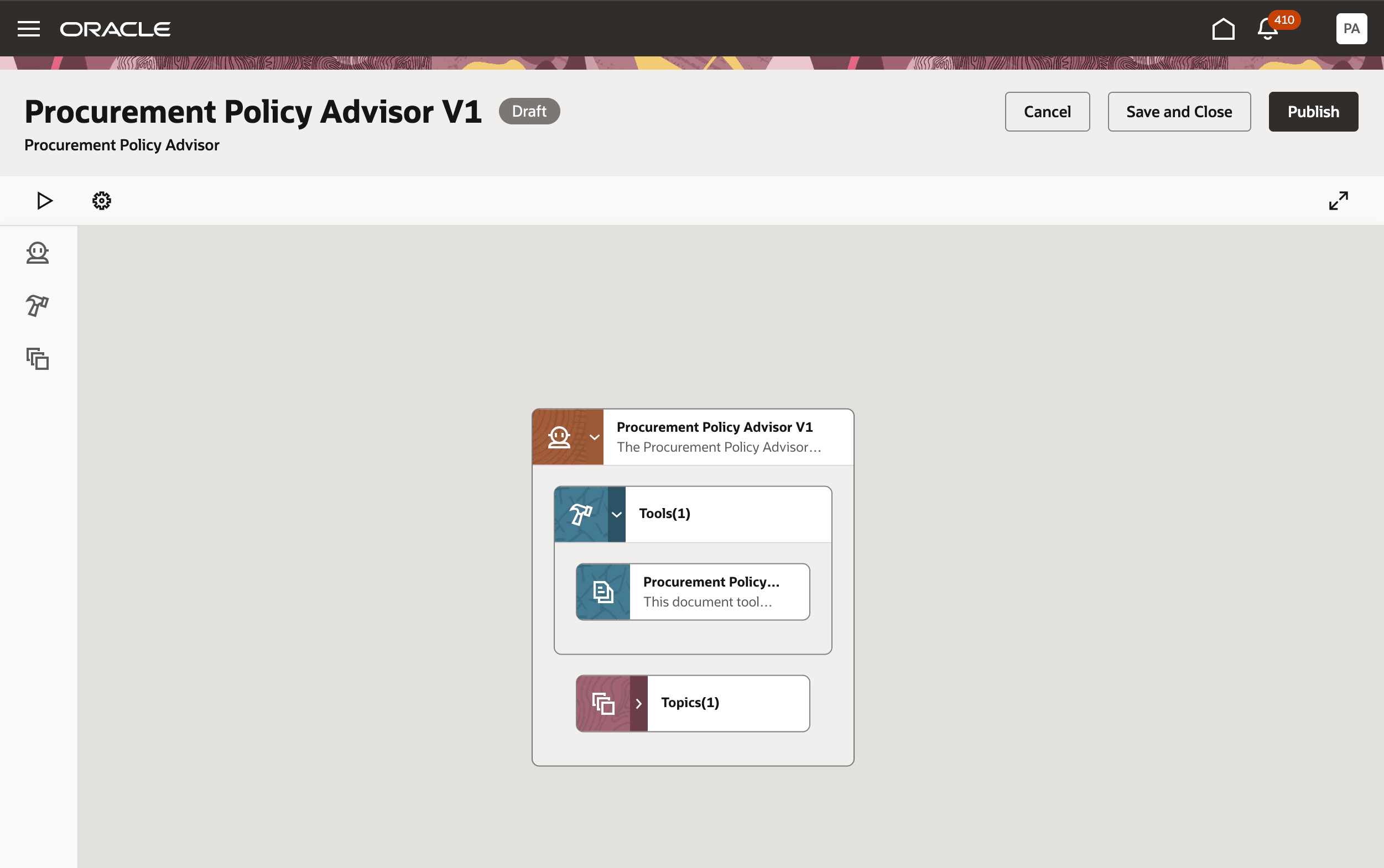
A Procurement Policy Advisor AI Agent is an intelligent, generative AI-driven assistant designed to guide employees through the procurement process by providing real-time, context-aware answers regarding company policies, standards, and regulations. Embedded directly within procurement software (such as Oracle Fusion Cloud Procurement), these agents replace static, hard-to-navigate policy manuals with conversational, in-app support.
These agents act as virtual assistants, analyzing uploaded policy documents, category guidelines, and contracts to ensure that every purchasing requisition complies with organizational governance, thereby minimizing risks and reducing the need for manual, time-consuming review.
Key Features of a Procurement Policy Advisor AI Agent
- Contextual Policy Guidance: Users can interact with the agent within the purchasing screen to get instant, precise answers on topics such as:
- Approval thresholds and workflows.
- Vendor eligibility and preferred supplier lists.
- Budget caps and spending guidelines.
- Correct purchasing documentation.
- Conversational Interface: Replaces traditional, static PDF manuals with an intuitive, interactive chat interface.
- Intelligent Document Interpretation: The AI scans and interprets internal policies, standard operating procedures (SOPs), government compliance standards, and category-specific contracts to provide accurate guidance.
- Real-Time Compliance Checking: The agent proactively checks requisitions against policy as they are being created, identifying potential non-compliance (e.g., maverick spending) before submission.
- Automated Knowledge Retrieval: Instead of emailing HR or Legal, employees receive 24/7 answers, speeding up the requisition process and reducing the workload on specialized teams.
- Support for Diverse Documentation: Capable of handling a wide range of documents, including localized legal requirements and regulatory material.
- Proactive Alerts: The agent can send alerts regarding policy breaches or when actions deviate from contractual terms.
Benefits
- Faster Execution: Instant access to policy details accelerates requisition creation and reduces process friction.
- Improved Compliance: Proactively guides users to adhere to governance standards, reducing audit risk.
- Reduced Operational Cost: Minimizes manual, repetitive tasks for procurement teams.
- Enhanced User Experience: Provides a seamless, self-service experience for employees.
The Procurement Policy Advisor agent provides users with seamless access to procurement policies, allowing them to ask questions about products and services while ordering what they need to get their jobs done.
The agent includes these tools:
Tool Name: Procurement Policy Document
- Tool Type: Document
- Details: You can attach and publish your procurement policy and guidelines documents. The agent will use the information in these documents to answer questions.
Procurement Policy Advisor
Using the Procurement Policy Advisor agent helps your business to:
- Streamline access to policy and process documents when creating a requisition.
- Improve compliance by providing policy guidance when users submit requisitions.
Steps to Enable
You can use AI Agent Studio to use or copy a preconfigured agent template to create Agents for your business processes. To automatically add a suffix to all artifacts in your agent team, you can Copy Template instead of Use Template. When you copy a template, you're directly taken to the agent team canvas where you can edit the agent team settings, agents, tools, and topics. The Use Template option takes you through a step-by-step process for configuring each artifact in the agent team.
Tips And Considerations
If you created any AI agents in the applications before update 25C, we recommend that you replace your existing agent with an agent you create in Oracle AI Agent Studio for Oracle Fusion Cloud Applications. You can migrate the document tool you created for your existing agent to AI Agent Studio. Here’s how:
- Go to My Client Groups > Show More > Configure RAG Agents.
- Click the Tools tab, then click Migrate action for your tool.
- Enter a unique name and tool code, and select the relevant family and product for your agent. You’ll use the tool name to locate your tool in AI Agent Studio.
- Click OK.
After your tool is migrated, create a new agent in AI Agent Studio using the appropriate template, add your migrated tool, and publish your agent. Then, create a new guided journey and add an agent task of the type Workflow Agent for the new agent you just created in AI Agent Studio. Next, update the guided journeys with the new journey code where you’ve enabled your previous agent so that the journeys use the new agent. After you have tested and verified your new agent, you can use the Delete action in Configure RAG Agents to remove the original agent.

Comments